About Me

- Patty
- Hi! My name is Patty aka SUNSPOTPP. I am presently a SAHM to my 4 yr. old grand daughter, Autumn, whom I adopted Dec. 12, 2008. I am 6 hrs (2 classes) away from my Associates Degree as a Drug/Alcohol Counselor, but had a set back in my health and have had to put that on hold for now. I have been PSP'ing for about 7 yrs. PSP is a GREAT stress reliever for me and I try to play as often as I can. Oh yeah, I live in Dublin, TX in the wonderful USA, home of the "Original" Dr Pepper that still uses "Imperial pure cane sugar"! If you want to know anything else, just ask! ♥ Me


Saturday, February 5, 2011
 Look Who's Baaaaaaaaaaaaack!

 6:22 PM |
 Posted by
Patty

OMG can you believe it?
I am FINALLY back!
And back with a vengeance too *hehe*!
WOW, where do I start...
First of all, as you can now see, I not only have an AWESOME new name for my blog thanks to my BFF, Linda, but also a whole new layout thanks to Ali *woohoo*!
Thank you both from the bottom of my heart *hugs*!
Bear with me while I update everything and then I will be back explaining why the long hiatus...I promise *winks*!
WooHoo Patty is baaaaaaaaaaack *dances*!

Tuesday, October 6, 2009
Juicy Blog Award

I've received this cute Award from Artmama aka Candee who lives in Sin City...lucky duck *winks*!
Candee and I are so much alike it is not even funny, actually, it's a little scary LOL!
Artmama is an AWESOME tagger, scrap kit maker, and now tut writer as well!
Thank you Candee for this cute blog award *hugs*!
I'm to give it to 3 others, so I will pass it on to 3 wonderful ladies I have met at Rac Stalkers who have made me feel right at home from the get go...
I'm to give it to 3 others, so I will pass it on to 3 wonderful ladies I have met at Rac Stalkers who have made me feel right at home from the get go...
Susan of Shal's World
Mindy of Sinfully Sweet Creations
Bwitchen of Bwitchen's Creatively Speaking
Peace & Love
Sunday, September 13, 2009
Rac Zodiac
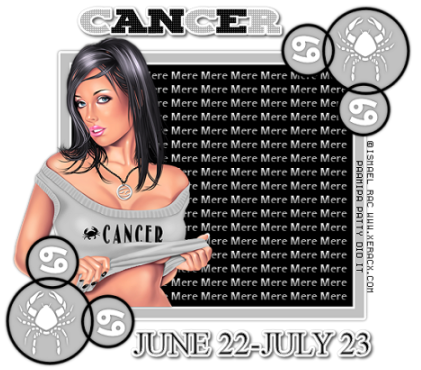
Times New Roman font for Dates
Futura HV font for Name
Penta Filter-Color Dots
Eye Candy 4000-Gradient Glow
Let's Get Started:
Shift D to copy original template.
Delete original template.
Delete Raster 3, © layer.
Square layer selections all, float, defloat.
New raster layer and flood fill with color that coordinates with tube being used.
Select none.
Delete Square layer.
Square Frame layer, selections all, float, defloat.
Open Paper 2 from Zodiac Scrap Kit & copy as new layer.
Resize 65%.
Selections invert, delete on keyboard.
Selections none.
Drop Shadow 0,0,50,5
Delete Square Frame.
Raster 2 layer, selections all, float, defloat.
Paper 2, paste as new layer, resize 85%.
Selections Invert, delete on keyboard.
Selections none.
Delete Raster 2.
Circles layer selections all, float, defloat.
Add new raster layer and floodfill with coordinating color.
Selections none.
Same drop shadow as above.
Delete Circles layer.
Cancer & Symbol (or whichever Zodiac you are using) layers same drop shadow as above.
Words layer selections all, float, defloat.
New Raster Layer and floodfill alternating 2 coordinating colors.
Penta.com-Color Dot 90,2,255,255,255.
EC 4000 Fat Gradient Glow 3.00, 25, 100
Drop Shadow 2,2,74,5
Delete Words Layer.
New Raster Layer.
Type in Dates to correspond with Zodiac Sign.
Same Gradient Glow and Drop Shadow as on the Zodiac name.
Paste Tube above the Frame layer below the Circle layers.
Resize 65%.
DS 0,0,50,5
New Raster layer above the background layer.
Type name several times so that it goes all the way across the background.
Copy and paste the name until the whole background is covered.
Inner Bevel and DS 0,0,50,5
Add your ©, merge visible layers and save as .png or .jpeg.
Thank you for trying my tut!
Peace & Love!
This tut was written by me, Patty Palmer aka SUNSPOTPP, on Aug. 31, 2009.
Any resemblance to any other tutorial is purely coincedental.
Sunday, September 6, 2009
New Layout
One down and one to go!
My last post I said I would be changing the layout and then hopefully writing a tut or two, well here is the new layout FINALLY thanks to MandaK of Double Vision!
Isn't it just AWESOME *jumps up & down*?
WooFrickinHoo, thank you again MandaK *hugs*!
I have been looking and looking for a new one and every time I thought I found one I like then I couldn't come up with a decent header to go with it *blushes*!
Thank goodness I ran across MandaK & Double Vision 'cuz now what you see is what you get *lol*!
I have been down with the bug for the past several days and as soon as I can hold my head up for any period of time I will get my Rac Zodiac tut written up *winks*!
Peace & Love,
Me
Monday, August 17, 2009
I'm Baaaaaaaaack
Hello again my friends  Okay, so I have been a bad bad blogger again, well not totally 'cuz the main reason I haven't been here still goes back to my previous post...got a virus/trojan, had to buy not 1, but 2 new PC's (don't ask), attempting to rebuild ALL of my lost PSP stuff, recover from a hysterctomy, and THEN my forum went down!
 So yeah, things have been a little crazy trying to rebuild and then get my site back up and running!
 I can now proudly say that we are back up, running, and having lots of fun!
 I am still having problems on the homefront with my son, but as I always say, this too shall pass, as long as I...
 Sooooooooooooo, please stay tuned and bear with me as I attempt to change my layout and hopefully have a tut or two up before too long .
 Peace & Love


Okay, so I have been a bad bad blogger again, well not totally 'cuz the main reason I haven't been here still goes back to my previous post...got a virus/trojan, had to buy not 1, but 2 new PC's (don't ask), attempting to rebuild ALL of my lost PSP stuff, recover from a hysterctomy, and THEN my forum went down! So yeah, things have been a little crazy trying to rebuild and then get my site back up and running!I can now proudly say that we are back up, running, and having lots of fun!I am still having problems on the homefront with my son, but as I always say, this too shall pass, as long as I...Sooooooooooooo, please stay tuned and bear with me as I attempt to change my layout and hopefully have a tut or two up before too long .Peace & Love Sunday, June 7, 2009
New Award
New Award

Go check out her blog for all of her gorgeous kits, layouts, and tuts!
Thank you again Auri!
Thank you again Auri!
You know, this Award REALLY put a HUGE smile on my face and in my heart as well 'cuz it is nice to know that even if you are not here blogging or writing tuts on a daily basis there are still people out there who love you and appreciate you for who you are...THANK YOU xoxo!
THE RULES SAY TO PASS ON TO OTHERS SO HERE WE GO...
Brandi of BamaVamp's Lair
Kimberly of Scrap Rebellion
Caitlin of Cupcake Sprinkles by Caitlin
Beth of Blissfully Beth
Friday, June 5, 2009
Recovering from Surgery
Yeah I know, I have been a very bad blogger again :( !
1st of all I bought a new PC and evidentally it was infected when I got it and it wiped out everything off of my External HD...ALL of my PTU scraps, tubes, fonts, receipts, etc.
Being it was infected by trojans and viruses, the 1 yr. warranty didn't cover it so I ended up buying yet ANOTHER new PC.
This time I bought a HP and am absolutely LOVING it!
I then had to kick my 22 yr. old son, Kyle, out and let me tell you...TOUGH LOVE is a biotch!
Then on top of all of this, I have been having severe female problems for years, but FINALLY found an AWESOME Dr. who actually listened to what I said.
After several tests, biopsies, and sonograms, I went in for a LSH on Tuesday and came home Wednesday.
I am still pretty sore & very tired and have been spending most of my time sleeping and/or sitting here briefly still working on re-building my PSP library.
I did do a tag a couple of nights ago, so I think I will write it up and get it posted hopefully before the weekend is up ;)!
I hope everyone is doing well *hugs*!
Peace & Love,
Me
Thursday, May 21, 2009
New Award~Blog Magico

I received this award from Sylvie of SyllyCreationz!
Thank you so very much hun :-) *hugs*!
The rules are to put the name and link of who gave you this award on your blog.
Then pass it on to 10 blogs which you think are magical ;-)!
Here are my 10 magical blogs of my choosing (that hopefully don't already have it):
1. Denise of Tell Me More, Tell Me More
2. Kathy of Scrappin' With TizzysAngel
3. Michal of Michal's Designz
4. Mel of Believe N Dreams
And it looks as if everyone else has already received one, so this will have to do for my list for passing on ;-)!
Tuesday, April 14, 2009
Tag...You're It
Tag!
I've been tagged by Denise aka SummerLovingGal at Tell Me More! Tell Me More!
Denise is an AWESOME friend and I am sooooooooooo proud of her on her weight loss...WTG girlfriend *hugs*!
8 Things I am Looking Forward To:
1. Watching Autumn & Peyton grow up
2. Finding a Dr. that can help me with my back problems
3. My adult son, Kyle, getting clean
4. Kyle growing up & becoming responsible
5. Kyle respecting me
6. My adult daughter, Kimmie, finding someone who will love & respect her and Peyton the way they deserve to be
7. Moving, whether it be to the coast or just a bigger house here in San Antonio, TX/USA
8. Finding happiness
8 Things I Did Yesterday:
1. Woke up
2. Spent quality time with Autumn & Peyton playing outside
3. Did some laundry
4. Cooked supper
5. Fought with Kyle
6. Washed dishes
7. Looked for houses online
8. Curled up in bed with a book and went to sleep
8 Things I wish I could do:
1. Move to the coast
2. Wake up JUST 1 morning and NOT be hurting
3. Get my Associates Degree (only need 6 hrs) and continue on for my Bachelors
4. Start my Internship as a Drug/Alcohol Counselor working with adolescents
5. Lose some weight
6. Clean my garage and get rid of all the junk
7. Be more organized
8. Move to the coast
8 Shows I watch:
1. Law & Order: SVU
2. Intervention
3. American Idol
4. Nancy Grace
5. Law & Order: Criminal Intent
6. Dancing With the Stars
7. One Life To Live
8. General Hospital
8 People I Tag:
1. Kathy aka TizzysAngel of Scrappin' With TizzysAngel
2. Melissa aka Honeywing of Believe N Dreams
3. Beth aka Kat of Blissfully Beth
4. Caitlin of Cupcake Sprinkles
5. Chelle of Weescotslass Creations
6. Sylvie of Sylly Creationz
7. Butter of ButterflyFlutterby Creations
8. Mea of Le Lezione
BAD BAD Girl
Okay, so I have been a VERY bad girl...bring on the whips...I'm READY (LOL)!
Time just is NOT on my side right now.
So what's going on with me...
The girls and I went to the coast for what was suppose to be only 4 days and ended up being 9!
How AWESOME it was too, even if the weather didn't cooperate every day.
Every one, especially me, was at total peace!
The girls came down with a viral infection a couple of days before we left and we had to take them to the ER in Corpus Christi, but with viral infections there is nothing you can do but alternate Tylenol & Motrin and keep them as comfortable as possible.
Yeah right...try telling a 2 1/2 and a 2 year old that!
Since getting back home, I, too, have come down with it and feel like total crap plus I am FINALLY back on my meds and trying to readjust to that as well...fun fun!
While there we looked at a few houses 'cuz now that I have been approved for Diability I figure if I can't work then I might as well be somewhere I am happy!
I thought with us going away for a little break that things would be better here on the homefront, but unfortunately it is NOT!
I thought with us going away for a little break that things would be better here on the homefront, but unfortunately it is NOT!
I know you cannot run from your problems, but I can sure distance myself from them, which is another reason for seriously thinking about moving to the coast!
This is STILL a possibility, just not sure when yet!
I have a ton of new scraps and tubes, now I just need to find my mojo...guess I left it at the coast (LOL)!
I hope you are all doing well and I promise to try and be a better blogger!
HUGE hugs & kisses!
Peace Out!
Me
Friday, February 20, 2009
Friendship Award
Wow, yet another Award!
Beth is a GREAT tagger and Template maker who I am proud to call my friend *hugs* !

This seal is being given to the blogs which are very charming, these bloggers aims are to find friends not self promotion.
The hope of this award is that, even when the links are cut, even more friendships are propogated.
Give this award to eight blogs, who in turn must pass it on to eight more blogs, along with the award and the rules.
I would like to pass this award on to:
Caitlin of Cupcake Sprinkles
Michal of Michal's Designz
Kimberly of Scrap Rebellion
Kathy of Scrappin' With TizzysAngel
Melissa of Believe 'N' Dreams
Denise of Tell Me More, Tell Me More
Mere of Scraps by Mere
Trish of Dreamland Designs
Check out their Blogs and make some really cool friends!
Please keep this award/friendship roll going!
Sunday, February 15, 2009
Challenge
Go to your photo folder in your computer.
Go to the 6th folder of photos.
Go to the 6th picture.
Put the picture on your blog and a description of it.
Invite 6 friends to join the challenge.
Link them in your blog and let them know they have been challenged.
Here is my photo...

This is a picture of my beautiful grand daughter (sons), Autumn, who I have had since she was 2 days old and just adopted Dec. 12, 2008.
It was taken Oct. 08, 2008 while I was in the dining room looking into living room at her and Peyton, my other grand daughter (daughters), who you can just see part of in the upper left corner ;) !
I told her to "smile pretty for NaNa" and that is exactly what she did.
I call her my 'Lil Sunshine 'cuz she is what keeps me going no matter how difficult things are or how bad I am hurting.
I am now passing this challenge to following blogs:
Suz of Suz Creations
Kimberly of Scrap Rebellion
Chelle of Weescotslass Creations
Trish of Dreamland Designs
Kristin of Wicked Scrapz
Mere of Scraps by Mere
Wednesday, February 11, 2009
2 "Look How Cool Blog" Awards
"Look How Cool Blog" Award

Oh WOW...I received 2 of the same Awards from 2 AWESOME friends!
Thank you so very much *hugs*...
Caitlin of Cupcake Sprinkles
&
Denise of Tell Me More, Tell Me More!
Denise of Tell Me More, Tell Me More!
Here are the Rules:
• Display the image of the stamp "Look How Cool Blog" you just won!
• Post the blog link you provided.
• Indicate your choice of 10 blogs.
• Let them know.
• Post the rules.
• Check if the blogs post the prize and followed the rules.
• My blog choices are:
• My blog choices are:
1. Kathy of Scrappin' With TizzysAngel
2. Melissa of Believe 'N' Dreams
3. Beth of Blissfully Beth
4. Mea/Connie of Le Lezione
5. Fi of Scraps By Fi
6. Yarrow of Fall3n Angel Scrapz
7. Brandi of Grunge & Glitter Scraps
8. Butter of Butterfly Flutterby Creations
9. Tanya of Scraps by j0eswife
10. Denise of Designs by Scrappy Redhead
Saturday, January 31, 2009
Shot Through the Heart

Supplies:
Paint Shop Pro
Font of choice - I used TrebuchetMS for the Lyrics & DJ Love for the Name
Brushes, doodles, or glitter doodles of choice.
EyeCandy 4000 Gradient Glow.
Note: I actually used a paid kit that I bought over a year ago, but the scrapper is no longer available, so I found ya'll a free one to use instead.
Let's begin:
Open Template 142, shift D to make a copy, and delete the original template.
X out the credits layer.
Click on background layer, image, canvas size and change to 700 x 700, we will resize later.
Still on background layer, floodfill with white.
Click on circle 1, selections, select all, float, defloat.
Copy & paste paper 2.
Selections, invert and click delete on your keyboard.
Selections none.
Adjust, hue & saturation, colorize 255, 0.
EyeCandy Gradient Glow, fat glow with a glow width of 5 in the red from your tube.
Using your magic wand click on the red glow.
Adjust, add/remove noise, uniform 40, monochrome checked.
Drop shadow - I used 0,0,63,3 Black.
Delete circle 1 layer.
Click on circle 2 and do the same as on circle 1.
Click on background frame 1, selections all, float, defloat.
Copy & paste paper 10.
Resize 50%.
Selections, invert, click delete on your keyboard.
Selections none.
Adjust, hue & saturation, colorize 0, 177.
Delete background frame 1.
Click frame 1 and add same fat red glow as above except change the width to 3.
Drop shadow same as above.
Using your magic wand click on the black frame and add the same noise as above.
Click on heart 1, selections, all, float, defloat.
Copy & paste paper 2.
Resize 50%.
Selections, invert, click delete on your keyboard.
Colorize to 255, 0.
Add same drop shadow as above.
Delete heart 1.
Click on heart 2, selections, all, float, defloat.
Copy & paste paper 1.
Copy & paste paper 1.
Resize 50%.
Selections, invert, click delete on your keyboard.
Colorize to 0, 177.
Selections, invert, click delete on your keyboard.
Colorize to 0, 177.
Using your magic wand click on the red heart and add the same noise as above.
Add same drop shadow as above.
Delete heart 2.
Add same drop shadow as above.
Delete heart 2.
Click on frame background 2, selections all, float, defloat.
Copy & paste paper 1.
Copy & paste paper 1.
Resize 50%.
Selections, invert, click delete on your keyboard.
Selections none.
Adjust, hue & saturation, colorize 0, 177.
Delete frame background 2.
Selections, invert, click delete on your keyboard.
Selections none.
Adjust, hue & saturation, colorize 0, 177.
Delete frame background 2.
Click frame 2 and add same fat red glow as above except change the width to 3.
Drop shadow same as above.
Using your magic wand click on the black frame and add the same noise as above.
Using your magic wand click on the black frame and add the same noise as above.
Repeat for frame background 3 and frame 3.
Go back to raster 6 and add new raster layer.
Type in the 1st part of your lyrics.
Image, rotate, free rotate, left, 10.
Raster 7, new layer.
Type in the rest of your lyrics.
Image, rotate, free rotate, right, 5.
Close out your background layer.
Merge visible.
Resize merged layer 90%.
Move up and to the right a bit.
Paste tube and position so that the arrow is shooting through the heart, see my tag for reference.
Same drop shadow as above.
Add any other embellishments of your liking or leave as is.
Add © info, license #, and name.
Crop, resize to your liking, and save as either a .png or .jpeg.
Thank you for trying my tut.
Hugs & kisses!
<3
Me
This tutorial was written by me on January 25, 2009 and is my own idea and creation.Any other tutorials found to be similar is coincidental!
Thursday, January 29, 2009
Happy Birthday Me


Happy birthday to me
Happy birthday to me
Happy birthday dear me
Happy birthday to me!

Wednesday, January 28, 2009
My 1st Award
OMG I don't even know what to say 'cuz I, too, like Beth, don't think of myself as a designer, but hey it got me an Award...LOL!
Thank you so very much for your words of encouragement, inspiration, and friendship Beth *hugs* !

I hope I am doing this right...
~~~~~~~~~~~~~~~~~~~~~
I would like to pass this on to a GREAT friend and fellow Texan who does amazing scraps, word art, templates, and tuts, Kimberly of Scrap Rebellion!
~~~~~~~~~~~~~~~~~~~~~
As well as another GREAT friend, Michal of Michal's Designz who has been writing tuts for a while, but just started up her Blog and is even now making FANTASTIC Templates & Layouts!
~~~~~~~~~~~~~~~~~~~~~
And last, but certaintly not least, even though I am sure Fi has already gotten a ton of these, I have GOT to pass this on to Fiona of Scraps by Fi 'cuz it is all her fault that I even started all of this!
Thank you ALL!
GREAT BIG HUGE hugs & kisses!
Me
Disappearing Blog
OMG I have been going totally nuts the last few days 'cuz I couldn't see my Blog, except for the plum background and my music box!
I searched high and low for a fix, but to no avail.
Then my dear friend Denise found the problem...I had the Adult Content clicked to yes!
So I changed it to No and voila I can see my Blog again...go figure!
So now I can quit stressing and start tutting...LMAO!
I hope ya'll are ALL having an AWESOME day!
Muaaaaaaaah!
Peace Out!
Me
Sunday, January 25, 2009
New Look
So what do ya'll think of the new look :-) ?
It was the closest I could find for free that was kinda gothy :-p!
Thanks to Shaz at Shaz & Livvy's Place for the AWESOME layout & header and Wanda at Bluedream Designs for the AWESOME kit Livvy used to make the layout & header ;-) !
I have a new tut on the way and hopefully will have it up by tonight!
Have a GREAT day!
HUGE hugs & kisses!
<3
Me
Thursday, January 22, 2009
Slacker
Yup, that's me, a slacker  !
!I even bought a ton of new scraps yesterday, that I found on sale, thinking that would get my mojo going...NOT !
!Instead I feel so overwhelmed...new tubes, new scraps, and ALL of these templates available everywhere!
!Ya know though, it also could be 'cuz I am down in my back again and just cannot sit here for too long of a period, plus the pain meds that make me soooooooooooo sick to my stomach !
!But anyway, hopefully with these new scraps and new tubes I got earlier, I will be able to get something else up soon !
!'Til then...
Love & Peace !
!Me

Tuesday, January 20, 2009
1st Tag Made with One of My Tuts
OMG Michal!
Thank you so very much not only for trying out my tut, but for this AWESOME tag as well!
I absolutely LOVE it hun!
HUGE hugs & kisses!
Luv ya girl!
<3
Me

Subscribe to:
Posts (Atom)


