About Me
- Patty
- Hi! My name is Patty aka SUNSPOTPP. I am presently a SAHM to my 4 yr. old grand daughter, Autumn, whom I adopted Dec. 12, 2008. I am 6 hrs (2 classes) away from my Associates Degree as a Drug/Alcohol Counselor, but had a set back in my health and have had to put that on hold for now. I have been PSP'ing for about 7 yrs. PSP is a GREAT stress reliever for me and I try to play as often as I can. Oh yeah, I live in Dublin, TX in the wonderful USA, home of the "Original" Dr Pepper that still uses "Imperial pure cane sugar"! If you want to know anything else, just ask! ♥ Me


Sunday, September 13, 2009
 Rac Zodiac

 1:32 AM |
  Posted by
Patty
Posted by
Patty
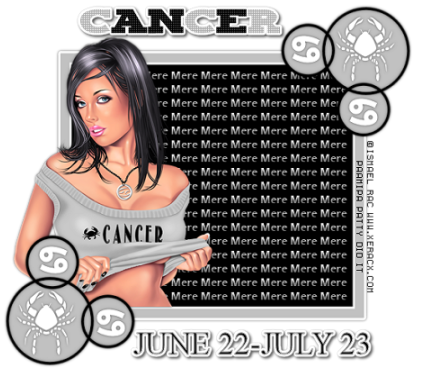
Times New Roman font for Dates
Futura HV font for Name
Penta Filter-Color Dots
Eye Candy 4000-Gradient Glow
Let's Get Started:
Shift D to copy original template.
Delete original template.
Delete Raster 3, © layer.
Square layer selections all, float, defloat.
New raster layer and flood fill with color that coordinates with tube being used.
Select none.
Delete Square layer.
Square Frame layer, selections all, float, defloat.
Open Paper 2 from Zodiac Scrap Kit & copy as new layer.
Resize 65%.
Selections invert, delete on keyboard.
Selections none.
Drop Shadow 0,0,50,5
Delete Square Frame.
Raster 2 layer, selections all, float, defloat.
Paper 2, paste as new layer, resize 85%.
Selections Invert, delete on keyboard.
Selections none.
Delete Raster 2.
Circles layer selections all, float, defloat.
Add new raster layer and floodfill with coordinating color.
Selections none.
Same drop shadow as above.
Delete Circles layer.
Cancer & Symbol (or whichever Zodiac you are using) layers same drop shadow as above.
Words layer selections all, float, defloat.
New Raster Layer and floodfill alternating 2 coordinating colors.
Penta.com-Color Dot 90,2,255,255,255.
EC 4000 Fat Gradient Glow 3.00, 25, 100
Drop Shadow 2,2,74,5
Delete Words Layer.
New Raster Layer.
Type in Dates to correspond with Zodiac Sign.
Same Gradient Glow and Drop Shadow as on the Zodiac name.
Paste Tube above the Frame layer below the Circle layers.
Resize 65%.
DS 0,0,50,5
New Raster layer above the background layer.
Type name several times so that it goes all the way across the background.
Copy and paste the name until the whole background is covered.
Inner Bevel and DS 0,0,50,5
Add your ©, merge visible layers and save as .png or .jpeg.
Thank you for trying my tut!
Peace & Love!
This tut was written by me, Patty Palmer aka SUNSPOTPP, on Aug. 31, 2009.
Any resemblance to any other tutorial is purely coincedental.

Sunday, September 6, 2009
New Layout
One down and one to go!
My last post I said I would be changing the layout and then hopefully writing a tut or two, well here is the new layout FINALLY thanks to MandaK of Double Vision!
Isn't it just AWESOME *jumps up & down*?
WooFrickinHoo, thank you again MandaK *hugs*!
I have been looking and looking for a new one and every time I thought I found one I like then I couldn't come up with a decent header to go with it *blushes*!
Thank goodness I ran across MandaK & Double Vision 'cuz now what you see is what you get *lol*!
I have been down with the bug for the past several days and as soon as I can hold my head up for any period of time I will get my Rac Zodiac tut written up *winks*!
Peace & Love,
Me
Monday, August 17, 2009
I'm Baaaaaaaaack
Hello again my friends  Okay, so I have been a bad bad blogger again, well not totally 'cuz the main reason I haven't been here still goes back to my previous post...got a virus/trojan, had to buy not 1, but 2 new PC's (don't ask), attempting to rebuild ALL of my lost PSP stuff, recover from a hysterctomy, and THEN my forum went down!
 So yeah, things have been a little crazy trying to rebuild and then get my site back up and running!
 I can now proudly say that we are back up, running, and having lots of fun!
 I am still having problems on the homefront with my son, but as I always say, this too shall pass, as long as I...
 Sooooooooooooo, please stay tuned and bear with me as I attempt to change my layout and hopefully have a tut or two up before too long .
 Peace & Love

Okay, so I have been a bad bad blogger again, well not totally 'cuz the main reason I haven't been here still goes back to my previous post...got a virus/trojan, had to buy not 1, but 2 new PC's (don't ask), attempting to rebuild ALL of my lost PSP stuff, recover from a hysterctomy, and THEN my forum went down! So yeah, things have been a little crazy trying to rebuild and then get my site back up and running!I can now proudly say that we are back up, running, and having lots of fun!I am still having problems on the homefront with my son, but as I always say, this too shall pass, as long as I...Sooooooooooooo, please stay tuned and bear with me as I attempt to change my layout and hopefully have a tut or two up before too long .Peace & Love Sunday, June 7, 2009
New Award
New Award

Go check out her blog for all of her gorgeous kits, layouts, and tuts!
Thank you again Auri!
Thank you again Auri!
You know, this Award REALLY put a HUGE smile on my face and in my heart as well 'cuz it is nice to know that even if you are not here blogging or writing tuts on a daily basis there are still people out there who love you and appreciate you for who you are...THANK YOU xoxo!
THE RULES SAY TO PASS ON TO OTHERS SO HERE WE GO...
Brandi of BamaVamp's Lair
Kimberly of Scrap Rebellion
Caitlin of Cupcake Sprinkles by Caitlin
Beth of Blissfully Beth
Friday, June 5, 2009
Recovering from Surgery
Yeah I know, I have been a very bad blogger again :( !
1st of all I bought a new PC and evidentally it was infected when I got it and it wiped out everything off of my External HD...ALL of my PTU scraps, tubes, fonts, receipts, etc.
Being it was infected by trojans and viruses, the 1 yr. warranty didn't cover it so I ended up buying yet ANOTHER new PC.
This time I bought a HP and am absolutely LOVING it!
I then had to kick my 22 yr. old son, Kyle, out and let me tell you...TOUGH LOVE is a biotch!
Then on top of all of this, I have been having severe female problems for years, but FINALLY found an AWESOME Dr. who actually listened to what I said.
After several tests, biopsies, and sonograms, I went in for a LSH on Tuesday and came home Wednesday.
I am still pretty sore & very tired and have been spending most of my time sleeping and/or sitting here briefly still working on re-building my PSP library.
I did do a tag a couple of nights ago, so I think I will write it up and get it posted hopefully before the weekend is up ;)!
I hope everyone is doing well *hugs*!
Peace & Love,
Me
Thursday, May 21, 2009
New Award~Blog Magico

I received this award from Sylvie of SyllyCreationz!
Thank you so very much hun :-) *hugs*!
The rules are to put the name and link of who gave you this award on your blog.
Then pass it on to 10 blogs which you think are magical ;-)!
Here are my 10 magical blogs of my choosing (that hopefully don't already have it):
1. Denise of Tell Me More, Tell Me More
2. Kathy of Scrappin' With TizzysAngel
3. Michal of Michal's Designz
4. Mel of Believe N Dreams
And it looks as if everyone else has already received one, so this will have to do for my list for passing on ;-)!
Tuesday, April 14, 2009
Tag...You're It
Tag!
I've been tagged by Denise aka SummerLovingGal at Tell Me More! Tell Me More!
Denise is an AWESOME friend and I am sooooooooooo proud of her on her weight loss...WTG girlfriend *hugs*!
8 Things I am Looking Forward To:
1. Watching Autumn & Peyton grow up
2. Finding a Dr. that can help me with my back problems
3. My adult son, Kyle, getting clean
4. Kyle growing up & becoming responsible
5. Kyle respecting me
6. My adult daughter, Kimmie, finding someone who will love & respect her and Peyton the way they deserve to be
7. Moving, whether it be to the coast or just a bigger house here in San Antonio, TX/USA
8. Finding happiness
8 Things I Did Yesterday:
1. Woke up
2. Spent quality time with Autumn & Peyton playing outside
3. Did some laundry
4. Cooked supper
5. Fought with Kyle
6. Washed dishes
7. Looked for houses online
8. Curled up in bed with a book and went to sleep
8 Things I wish I could do:
1. Move to the coast
2. Wake up JUST 1 morning and NOT be hurting
3. Get my Associates Degree (only need 6 hrs) and continue on for my Bachelors
4. Start my Internship as a Drug/Alcohol Counselor working with adolescents
5. Lose some weight
6. Clean my garage and get rid of all the junk
7. Be more organized
8. Move to the coast
8 Shows I watch:
1. Law & Order: SVU
2. Intervention
3. American Idol
4. Nancy Grace
5. Law & Order: Criminal Intent
6. Dancing With the Stars
7. One Life To Live
8. General Hospital
8 People I Tag:
1. Kathy aka TizzysAngel of Scrappin' With TizzysAngel
2. Melissa aka Honeywing of Believe N Dreams
3. Beth aka Kat of Blissfully Beth
4. Caitlin of Cupcake Sprinkles
5. Chelle of Weescotslass Creations
6. Sylvie of Sylly Creationz
7. Butter of ButterflyFlutterby Creations
8. Mea of Le Lezione
Subscribe to:
Posts (Atom)


